Enable Automatic Updates for Private Mobile Devices
Administrators can choose to activate automatic updates for mobile devices in their private cloud. Once per week, these devices will then be updated to the newest OS version that is available from the manufacturer for this specific device model.
Please note, that different device models do not share identical software-update support. This also varies greatly from one manufacturer to another.
For example, a Samsung mobile device could get the newest Android major-release sooner than a Sony mobile device, even if these devices were initially brought to market around the same time. Flagship devices are also expected to get a new major-release sooner than a budget device, even if they’re built by the same company.
We can only apply releases officially supplied by the device manufacturer!
To activate automatic updates for private mobile devices, switch to Administration (1), then navigate to Infrastructure (2), then switch to the Mobile Devices tab (3).

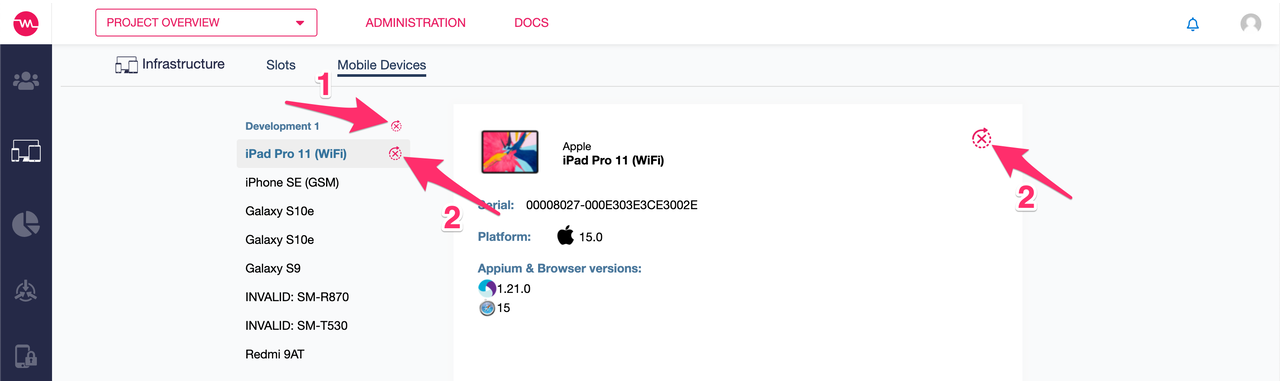
There are two options available: You can set a default for all devices there by clicking on the topmost auto-update button right beside the list title (1).
Despite setting a default you can also always configure single devices separately, to enable or disable some devices while leaving the rest at your default setting.
To configure a single specific device, hover or click on the device and use the corresponding auto-update button (2).