
webmate mobilebridge
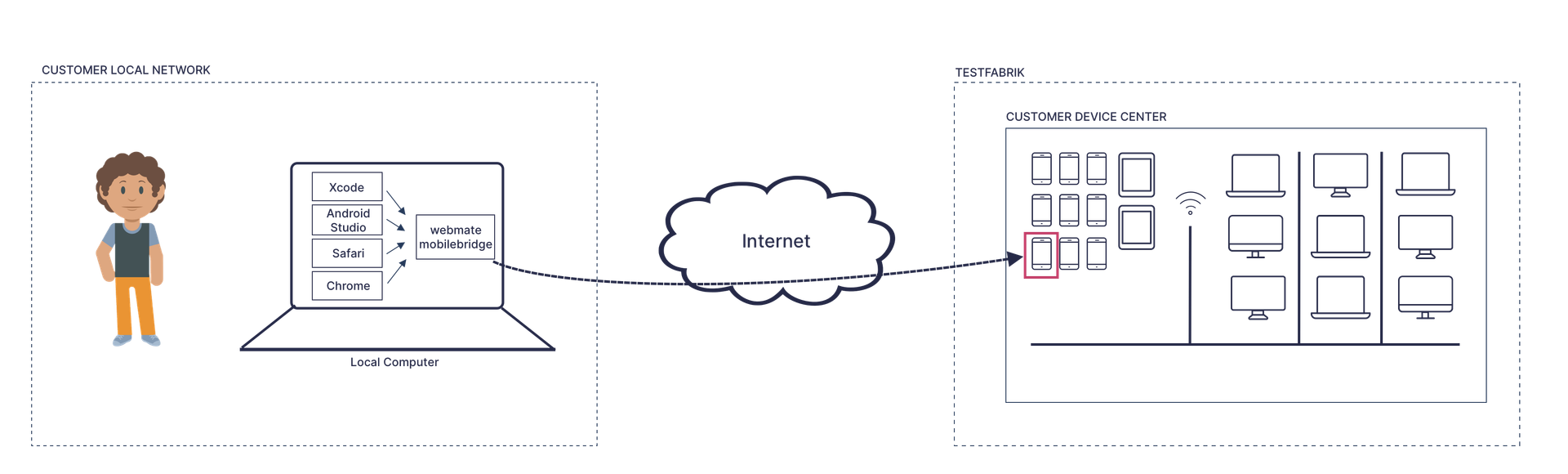
With the webmate-mobilebridge, you can use devices in your webmate device infrastructure as if they were
locally connected to your computer.
When testing on internal test systems, it can often be necessary to install custom root certificates in order to access those systems. The mobile bridge acts like a virtual USB connection to a device. It allows you to debug mobile apps and web applications with Xcode, Android Studio, Safari, or Google Chrome. You can also use native testing frameworks, such as Espresso or XCTest.
The webmate-mobilebridge can be started in iOS mode (available only up to iOS 16) and Android mode, depending on which kind of device you
want to access. These two modes work in similar but slightly different ways, as explained in the following sections.
Overall Architecture and Network Integration
In order to use the bridge you must install the webmate-mobilebridge binary on your computer: (The latest version of
the binary is 1.0.15. If you are not sure which version you are currently using on your computer, run webmate-mobilebridge --version to show its version on the terminal.)
| OS | Link | SHA-256 |
|---|---|---|
| Windows | Download (opens in a new tab) | fa5d8fb33882df27bbc2413c409710717311384741a6a58daf00937539be0d4a |
| Mac | Download (opens in a new tab) | 410fb2f8d6711ea87db3384a952089293b7dbaa502c3258ef1a7b47eab781247 |
| Linux | Download (opens in a new tab) | 99ea737c8ce1359bf4a919af8b74b57775998f335cc07660779c91fc60949793 |
webmate-mobilebridge source code.The binary is a stand-alone application with no dependencies. If you are running a Mac or Linux OS, you must make the
downloaded application executable before you can use it, e.g., by executing chmod +x webmate-mobilebridge
in a terminal.
During execution, the bridge communicates with the server app.webmate.io via SSL on port 443. The traffic
consists of HTTP requests and one or more WebSocket connections. Within the WebSocket connections, the
data stream from your local computer to your webmate mobile device is tunneled within SSH channels.
webmate-mobileconnect builds upon the great open-source project Chisel (opens in a new tab)
.
Android Mode
In Android mode, i.e., when you start the executable with webmate-mobilebridge android, the bridge
performs the following steps:
- A webmate mobile bridge session is started at webmate. For this, your user is authenticated and authorized.
- The device, as specified as an argument to the bridge executable, is looked up in webmate, and it is checked whether your user is permitted to access the device.
- The bridge tries to start and access a local ADB server on your machine. If no ADB server is found, this is an error. (The requirement to have a local ADB server available will be dropped in one of the next releases.)
- The bridge opens an ADB connection with the chosen device in the webmate cloud. The ADB traffic is tunneled via a WebSocket.
- After the ADB connection has been established, the bridge registers itself at the local ADB server as a remote Android device.
- At this point, the remote Android device is available to local ADB clients, such as Google Chrome or Android Studio.
- When the bridge session is terminated, the bridge unregisters at the local ADB server.
iOS Mode
In iOS mode, i.e., when you start the executable with webmate-mobilebridge ios ... on a local Mac device,
the bridge performs the following steps:
- A webmate mobile bridge session is started at webmate. For this, your user is authenticated and authorized.
- The device, as specified as an argument to the bridge executable, is looked up in webmate, and it is checked whether your user is permitted to access the device.
- The bridge checks if there is a local
usbmuxdUNIX socket at/var/run/usbmuxdon the local machine, which should always be the case on a Mac. - The bridge opens an usbmuxd connection at the chosen device in the webmate cloud. The USBMUXD traffic is tunneled via a WebSocket.
- The existing UNIX socket is moved to a safe place.
- A new UNIX socket is installed at
/var/run/usbmuxdand all connections opened on this socket are forwarded to the remote device. - At this point, the remote Apple device is available to local USBMUXD client, such as Xcode, Safari,
or
libimobiledevicetools. - When the bridge session is terminated, the old UNIX socket is reinstantiated automatically.
/var/run/usbmuxd is protected against modification, the
bridge must be started with sudo or as a system administrator to be able to divert the traffic.The full iOS mobile bridge functionality is currently available only for devices running iOS 16 or earlier because of platform changes in later iOS versions.
For web debugging on supported mobile devices, use the Workbench DevTools integration instead. See Use DevTools in the Workbench .
Custom webmate Instances
If you to use mobilebridge on a custom instance of webmate, you can pass the additional parameter --server-base with a URL to the API of your webmate instance, e.g. --server-base=xyz.webmate.io/api/v1.